n8n workflow automation connects applications and APIs so a business event can start a sequence of checks and actions. For example, a new enquiry can create a CRM record, assign an owner, and send an internal notification. Start with one repeatable process whose input, outcome, and recovery owner you can describe.
Before choosing a plan, answer three buyer questions: which business event should trigger the workflow, how will a failed or repeated event be recovered, and who will maintain each connection? Self-hosting gives your team operational responsibility. n8n Cloud reduces infrastructure work, but your team still needs to maintain the workflows.
This guide covers workflow examples, a monthly execution budget, hosting choices, and a delivery checklist. Pricing and the linked execution-counting guidance were reviewed on October 13, 2026. For the latest version or a specific bug fix, use the official n8n releases.
The Starter plan price was rechecked on October 22, 2026. The examples below separate a completed business outcome from a workflow that merely finishes without an execution error.
What Should You Automate First?
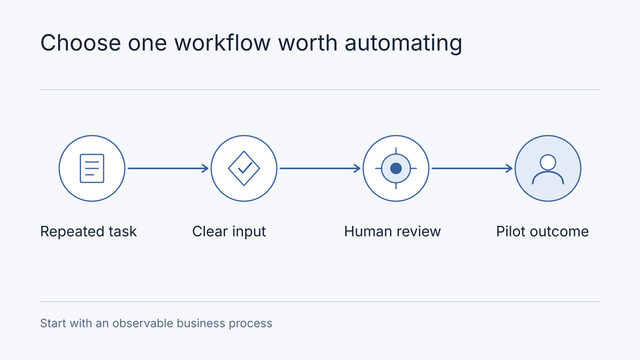
Choose a reading path: select one workflow, estimate operation, then prepare delivery. The outcome is a brief with a trigger, completed business result, exception owner and operating budget—not simply a connected node diagram.
Choose a process with structured inputs, accessible systems, and an owner who can resolve exceptions. These are illustrative starting points, not claims about delivered Nodesify projects:
| Process | Trigger and intended result | Failure boundary to agree |
|---|---|---|
| Enquiry routing | A submitted form creates one CRM record and assigns a service owner | Duplicate delivery, missing fields, or an unavailable CRM |
| Order reconciliation | Confirmed payment events are matched to orders and unmatched records enter finance review | Late events, mismatched amounts, or a refund that is still pending |
| Internal reporting | A schedule gathers approved records and prepares a summary for review | An unavailable source must be identified rather than silently omitted |
If the existing CRM or commerce platform already performs the task reliably, use that capability first. n8n is worth evaluating when the process needs to cross systems or apply rules the existing tools cannot express. Avoid starting with autonomous refunds, financial approvals, or customer promises. A draft or internal notification gives you a smaller recovery boundary.
Example: Route an Enquiry Without Creating Duplicate Leads
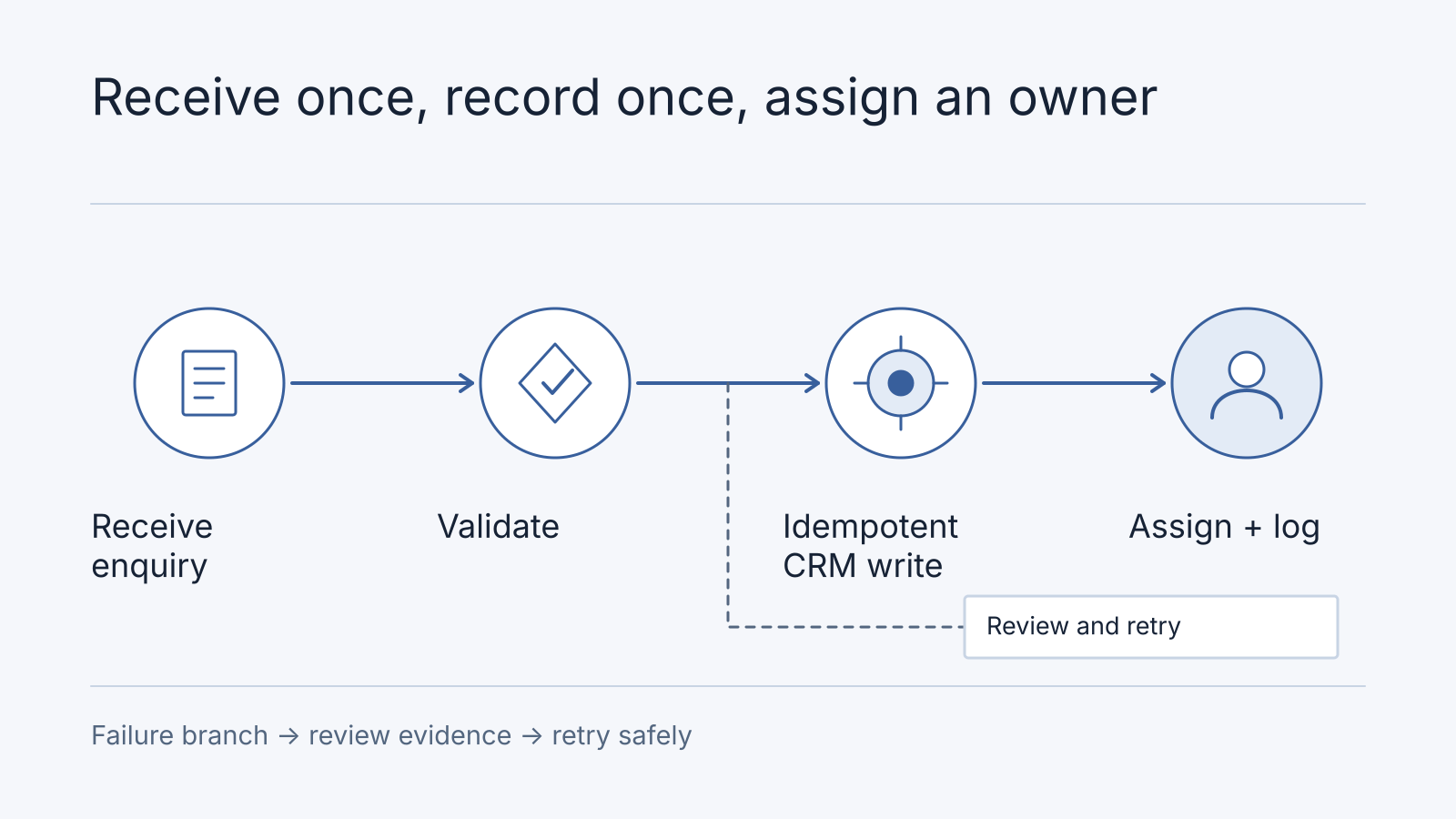
Use this as an illustrative workflow design, not a delivered Nodesify client result, and evaluate it against your own systems:
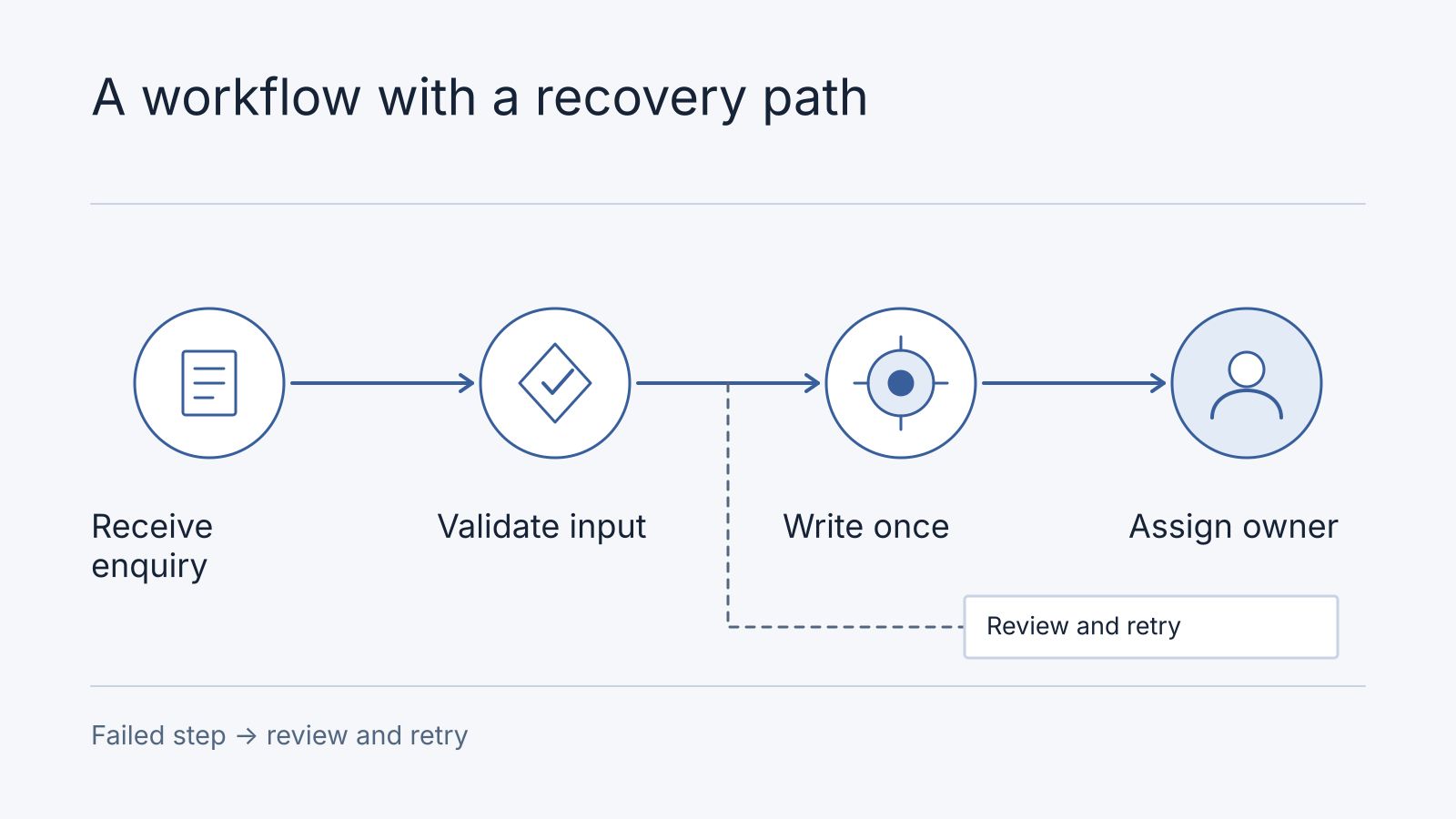
- Receive the enquiry from an authenticated form integration or webhook.
- Validate the required fields and look up the submission identifier to avoid processing it twice.
- Create or update the CRM record, keeping the original submission identifier for reconciliation.
- Route the enquiry using explicit rules, such as service requested or account owner.
- Record the result and alert an owner if an API call fails. Retry only operations that are safe to repeat.
An AI step can help draft a summary of a long enquiry, but routing a known service code does not need a language model. Keep human review for ambiguous requests and decisions that change customer commitments. Measure successful processing, duplicate records and time spent resolving exceptions.
Map the Design to n8n Nodes
A practical starting sequence is Webhook → If → CRM node or HTTP Request → assignment → notification. The Webhook node receives the event. An If node branches on validated conditions. A supported CRM node or HTTP Request node writes to the destination API.
Keep authentication between your form backend and n8n. Do not put an integration secret in the public form. Use the test webhook URL during development and the production URL for the published workflow. n8n documents separate URLs for these two uses.
Choose the response meaning explicitly. An immediate webhook acknowledgment means the workflow started, not that the CRM write succeeded. Record the final result separately so the sender or an operator can check completion. If assignment fails after the record is created, resume from that stage without creating another record or sending duplicate notifications.
Attach an error workflow using an Error Trigger to notify the recovery owner when an execution fails. Keep an explicit review branch for invalid business data too. A handled branch may complete successfully in n8n while the enquiry still needs human attention.
Turn the Example Into an Implementation Brief
Agree the input, output, and failure behavior before connecting production accounts. For this example, the input might contain submission_id, email, service, and received_at. The result should include the CRM record identifier and processing status so the business can trace an enquiry from receipt to assignment.
| Stage | Implementation decision | Evidence before launch |
|---|---|---|
| Receive | Authenticate the webhook and validate the payload | Invalid requests cannot create CRM records |
| Deduplicate | Store the submission identifier in a durable system with a uniqueness constraint | Two simultaneous deliveries create one logical enquiry |
| Update | Use the CRM’s supported create-or-update operation or idempotency mechanism | A retry after a timeout does not create another customer |
| Assign | Map service codes to a maintained owner list | Unknown codes enter a review queue rather than disappearing |
| Recover | Record failures and define which operations can be retried | An owner can reconcile and safely replay a failed enquiry |
A lookup followed by a create operation is not enough to prevent duplicates when two runs overlap. The destination system must enforce uniqueness or support an idempotent write. Keep credentials in the platform’s credential management, give integrations only the access they need, and avoid copying entire customer payloads into long-lived logs.
Use representative enquiries to check ordinary delivery, duplicate delivery, a CRM timeout and an unavailable owner. These are proposed acceptance checks, not results from a Nodesify client project. If the workflow depends on an undocumented system, resolve that dependency in an architecture audit before fixing the delivery price.
For workflows that retrieve answers from internal documents, our enterprise RAG implementation guide explains permissions and evaluation. For shipment events and reconciliation, see the logistics integration guide.
Two More n8n Workflow Examples to Scope
These are illustrative designs, not imported workflow templates or measured client results. Confirm the nodes and API operations supported by your systems before implementing them.
Match Payments to Orders for Finance Review
Start with an authenticated provider event or a scheduled retrieval of payment records. Normalize the payment and order identifiers, retrieve the corresponding order, and compare the amount, currency, and current status. Put missing or mismatched records into a review queue with a named finance owner.
For example, a payment of RM200 against an RM180 order should enter review rather than silently mark the order settled. The reason and identifiers must remain visible even if the n8n execution completes successfully. Check fees and net payouts separately from the gross customer payment.
Keep this first workflow read-only apart from its reconciliation record and internal notification. Automatic refunds or changes to paid entitlements need a separately agreed authority and recovery design. Our payment-gateway comparison explains why payment confirmation and bank settlement are different milestones.
Prepare an Internal Report With Missing-Source Warnings
Use a Schedule Trigger to retrieve approved records from each required source, record the reporting period, and prepare a draft summary. If a source is unavailable, label the draft incomplete and identify the missing source. Do not substitute zero for unavailable data.
For a daily bookings report, distinguish “zero bookings returned by the source” from “the source could not be reached.” Send the draft to a reviewer before wider distribution. If a language model writes the narrative, retain the source totals and have the reviewer compare them with the text. A fluent summary does not establish that every source was included.
Give Every Exception an Owner and a Recovery Route
Use this worksheet alongside the workflow diagram. It separates business exceptions from technical execution failures.
| Exception | Record to retain | Owner and next action |
|---|---|---|
| Invalid enquiry or unknown service | Submission ID, validation reason, and review status | Operations owner corrects or rejects the input |
| CRM request times out after a possible write | Submission ID and destination request reference | Integration owner checks the destination before replaying |
| Payment does not match an order | Payment ID, order reference, amount, and mismatch reason | Finance owner reconciles without issuing an automatic refund |
| Reporting source is unavailable | Report period and missing source | Report owner restores the source or explicitly withholds the report |
| An execution fails before reaching a review branch | Workflow and execution references, with a minimal error summary | Integration owner investigates the error workflow alert |
n8n’s error-handling documentation describes error workflows for failed executions. A business exception handled by a successful branch needs its own review status and notification. An error workflow alone cannot identify every incomplete business outcome.
Keep operational records long enough for the agreed reconciliation process, with access limited to the people who need them. Execution history has its own storage and retention settings. For self-hosting, n8n’s execution-data guidance explains how to reduce saved data and prune old execution records. Do not use temporary execution history as the only durable record of unresolved customer work.
If the current system’s retry or ownership behavior is unclear, the sample architecture audit report shows how to turn that uncertainty into evidence and an action plan. For automation embedded in an app nearing launch, use the AI-built app readiness checklist.
Cloud or Self-Hosted n8n?
Compare who will operate each part of the service:
| Decision | n8n Cloud | Self-hosting |
|---|---|---|
| Infrastructure | Check the provider’s plan, retention and support terms | Assign updates, backups, monitoring and recovery to your team |
| Workflows | Your team owns credentials, business rules and exception handling | The same workflow responsibilities apply |
| Budget | Include the subscription, usage limits and external services | Include infrastructure, any required paid features and operating time |
Choose based on the access, support and recovery arrangements your workload needs. A lower server bill alone is not a complete cost comparison.
The self-hosting documentation distinguishes the free Community edition from licensed Business and Enterprise editions. Self-hosting is not a promise that every paid feature is included. Check the access controls, collaboration, and recovery capabilities you need before choosing an edition. A third-party hosting offer also needs its own support and licensing review.
Check Licensing Before Deployment
n8n’s Sustainable Use License limits permitted use, including its internal-business-use condition. Enterprise code has separate terms. Review the license for your deployment model and confirm commercial terms with n8n if you plan to resell access or embed its interface in a customer-facing product. Paying a developer to configure a workflow and selling access to the n8n platform are different arrangements.
How Much Does n8n Workflow Automation Cost?
At review on October 13, 2026, n8n’s Starter plan listed EUR20 per month billed annually, with 2,500 monthly workflow executions. That is the platform price, not a complete implementation or operating budget. Confirm current limits, taxes, and contract terms before purchase.
Other platforms use different units. Make uses credits, while Zapier generally counts successful billable actions as tasks. A trigger is not simply equivalent to a paid task, nor is every platform’s unit equivalent to an n8n execution. Price a representative workflow, including retries, volume, paid connectors and model usage.
Example Monthly Execution Budget
An execution is a run of a workflow, not a charge for every node. The current execution-counting documentation distinguishes production runs from manual editor runs. A Schedule Trigger counts when it fires, while a polling trigger with no new data does not. Sub-workflow and error-workflow runs are excluded from the execution quota under the documented rules.
For an illustrative 30-day month:
| Workload | Calculation | Production executions |
|---|---|---|
| Enquiries that activate a webhook | 50 per day × 30 days | 1,500 |
| A separate hourly Schedule Trigger | 24 per day × 30 days | 720 |
| Total before additional top-level runs | 1,500 + 720 | 2,220 |
| Remaining capacity against a 2,500-execution plan | 2,500 − 2,220 | 280 |
That leaves little room for growth or repeated webhook deliveries. A duplicate request can consume an execution even when your workflow correctly prevents a duplicate CRM record. Record actual quota usage when replaying failures instead of assuming every retry or nested workflow has the same billing treatment. External API requests, model usage, and messaging costs need their own budget.
Separate Setup From Ongoing Costs
| Budget item | What the quote should explain |
|---|---|
| Workflow implementation | Connectors, field mapping, business rules, failure recovery, and acceptance checks |
| Platform or hosting | Plan limits, paid features, server resources, database, and backups |
| Connected services | CRM subscriptions, messaging charges, API usage, and model usage if required |
| Operation and support | Monitoring owner, credential renewal, update reviews, response coverage, and recovery work |
Use one reporting currency and record the exchange rate used for supplier prices in EUR or other currencies. Keep a setup quote separate from monthly charges so you can compare providers on the same scope.
To turn this into a comparable quote, give each supplier the same expected monthly events, retry rate, connector list, and hours of support coverage. Ask them to show a failed webhook, a duplicate submission, and a CRM outage in a demonstration. Record the observed result and recovery time before claiming reliability or labor savings. If those inputs are unknown, an architecture audit can establish the integration and failure boundaries first.
Compare n8n, Make, and Zapier on the Same Workload
| Tool | Billing unit | What to count in a representative workflow |
|---|---|---|
| n8n | Production workflow executions | Top-level triggers and schedules, plus separately charged external services |
| Make | Credits | Module operations and any token or other usage charges for the selected AI connection |
| Zapier | Successful billable actions | Successful task-counted steps, including those repeated when a whole run is replayed |
Do not compare plan prices by treating an execution, credit, and task as interchangeable. Give each supplier the same input volume and required outcome, then compare the recorded usage, connector limitations, and recovery procedure. A cheaper plan with an unsupported CRM operation does not cover the same job.
Move From Demonstration to Operation
The self-hosted AI starter kit is a starting point for experimentation, not evidence of a hardened or air-gapped production installation. Review authentication, network exposure, secrets, updates, backups and each service’s data flows.
For a first workflow, choose a reversible activity with clear success criteria. For example, prepare a draft internal summary from approved records and have a person review it before distribution. Add deduplication where repeated events could create duplicate records, and define retry and escalation rules.
Measure completed work, exception rates and support time before claiming savings. A workflow can reduce manual handling while still requiring monitoring and correction. There is no substantiated universal percentage saving across businesses. Document an owner and a recovery procedure so the automation remains useful when an upstream API or business process changes.
Find Release Notes and Plan an Update
Use the official release list to distinguish stable releases from prereleases and inspect changes for the version you intend to deploy. This article does not maintain a live version number. A newer version can change the nodes, authentication, or execution behavior your workflows depend on.
Record your installed version and read the intervening release notes. Before updating a self-hosted installation, back up its database and required configuration, verify that you can restore them, and run representative workflows in a separate environment. Include scheduled triggers, credential access, retries, and external callbacks in that review. Assign a deployment owner and a recovery decision point. Changing an image tag alone is not a recovery plan.
For ongoing responsibility after handover, our maintenance and support service can scope monitoring, update reviews and incident ownership alongside the workflow itself.
Checklist for Production Readiness
- Confirm licensing terms for your specific deployment model (team self-hosting vs managed).
- Map every API dependency and verify retries, failure handling, and dead-letter routing.
- Define alerting for stalled workflows and SLA windows before launch.
- Test rollback: restore a safe checkpoint in a staging workspace before scaling.
- Review data residency and logging retention if your company serves regulated sectors.
As a starting point, we suggest observing a representative workflow across 7–14 days before expanding its responsibilities. This is our planning recommendation, not an n8n requirement or a universal readiness threshold. Choose a period that covers your workload’s normal volume, scheduled cycles, and relevant exceptions. A monthly process or a low-volume workflow may need a longer observation period and controlled recovery demonstrations. Record how many inputs completed, how many required manual recovery, and how long those exceptions took. Include the actual operating cost when deciding whether the workflow saves useful staff time.
For a broader first-workflow decision, read our AI automation guide for Singapore SMEs. It covers process selection, review boundaries, and evidence before expanding automation.
If your automation is part of an AI-built application, the Manus versus custom development planning guide separates hosting, handover work and ongoing operating costs with a hypothetical example.
Frequently Asked Questions
Who owns and renews connected credentials?
Name a business account owner and an integration operator for each connection. Record permitted access, renewal/revocation triggers and the recovery route; keep secrets out of the brief. Supplier access should not be the only way the business can restore a connection.
What if n8n succeeds but the business task is unfinished?
Record a business status such as “awaiting owner” or “needs reconciliation” and notify the assigned person. A technically successful branch can still require human action. The durable business record, not a green execution icon, determines completion.
Is Self-Hosted n8n Free?
The Community edition can run without a paid license key, subject to its license terms. You still need to budget for infrastructure and someone to maintain the instance and workflows. Business and Enterprise features require the applicable license. Compare the edition you need, not just the server bill.
Does Every n8n Node Count as an Execution?
No. An execution is a workflow run. The current quota rules distinguish top-level production triggers and schedules from manual editor, sub-workflow, and error-workflow runs. Connected services may charge for individual requests or model usage, so your total cost can grow even when the n8n execution count stays the same.
Do I Need AI for Workflow Automation?
No. Known service codes, numeric thresholds, and explicit owner mappings can use ordinary rules. AI may help summarize or classify unstructured text, but it adds cost and a need to evaluate mistakes. Keep review for uncertain outputs and actions that change customer commitments.
Scope Your First Workflow
Download the implementation brief with a synthetic enquiry-routing record. It combines input fields, final status, exception owner, acceptance cases, quota assumptions and account/handover ownership. Replace the example volume and confirm current platform counting rules before budgeting.
Choose the purchase that matches readiness: unknown capability → bounded R&D; an existing failure or unclear boundary → architecture review; a known, approved workflow → enterprise implementation scope. Discovery is not a mandatory extra phase when the implementation requirements are already demonstrated.
For a Strategy Session, bring one process: its trigger, the systems involved, monthly volume, desired output, and what should happen when it fails. We can use those inputs to scope a research and development engagement, including integration and acceptance criteria. If an existing workflow has reliability or access problems, an architecture audit can establish the failure boundaries first.
Agree account ownership, handover documentation, and ongoing support before implementation. A successful demonstration is one milestone. The delivered scope must also say who keeps the workflow working after launch.